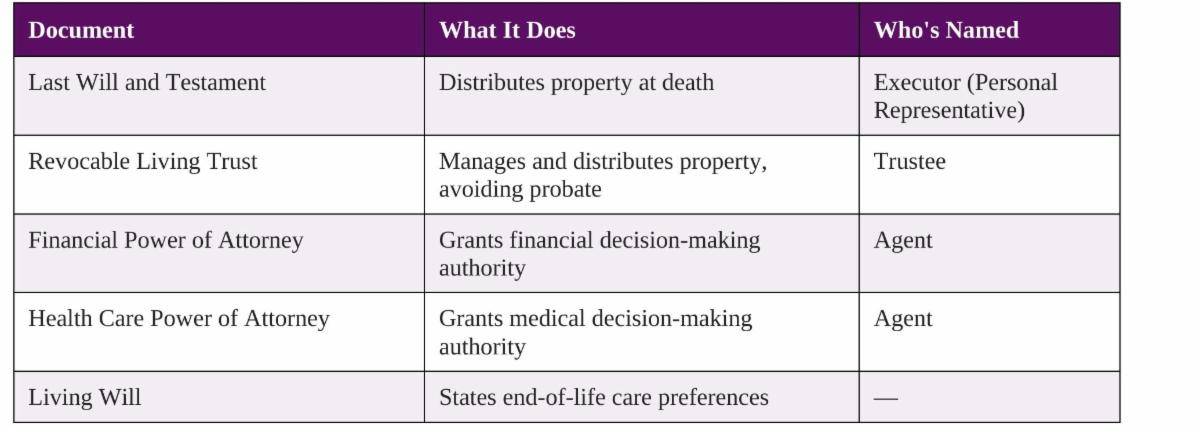
Most of the estate plans we review are in good shape. The will is current, the trust is funded, the beneficiary designations match the documents, the health care proxy names someone who will actually answer the phone.
Then we ask a simple question — if something happened to you tomorrow, could the person you named get into your email? — and the room goes quiet.
That silence is what digital estate planning is about. It is the least glamorous part of your plan and, increasingly, the part most likely to cause your family real trouble.
What We Mean By “Digital Assets”
The term is broad enough to be unhelpful, so it’s worth breaking into four categories that behave very differently.
Assets with independent monetary value. Cryptocurrency and self-custodied digital holdings, domain names, monetized channels or online storefronts, gaming accounts with resale value, and intellectual property in digital form — manuscripts, photograph libraries, software. All of these have independent monetary value.
Assets with sentimental value only. Twenty years of photographs in iCloud or Google Photos. Text message threads with a parent who has died. Video. Recorded voicemails. These have no dollar value and are frequently the thing families grieve losing most.
Accounts that are keys to everything else. Your primary email address is the single most important digital asset you own, because it is the password-reset destination for your bank, your custodian, your insurer, and your tax preparer. Your password manager and your phone number sit in the same category. None of these have value in themselves; all of them can be used to access valuable assets.
Obligations, not assets. Auto-renewing subscriptions. A business domain that lapses. Cloud storage that stops being paid for and gets purged. Two-factor authentication tied to a phone line a family member “helpfully” cancels three days after the funeral. These are obligations that in many cases should be serviced for a period after a loved one passes.
Digital estate planning means deciding, in advance and in writing, who gets access to each of these, how they will get in, and what you want done with them.
Why This Is Genuinely Hard
It would be reasonable to assume that if your executor has a death certificate and letters of appointment, the rest is paperwork. It isn’t, for three independent reasons.
Federal privacy law was written to keep people out. The Stored Communications Act prohibits providers from disclosing the contents of electronic communications to third parties. It was drafted in 1986 to protect users from snooping, and it makes no exception for a grieving spouse. Separately, the Computer Fraud and Abuse Act makes unauthorized access to a computer system a federal offense. This is why “my wife knows my passwords” is not a plan — it is, at best, an arrangement that works only as long as nobody scrutinizes it.
Terms of service usually say the account is not transferable. You do not own your Apple ID or your Gmail account in the way you own your car. You hold a license, personal to you, that a company’s contract terms may say terminates at death. Custodians have historically leaned on those terms to refuse access even when the estate’s authority was clear.
Most states have the statute that solves this. The Revised Uniform Fiduciary Access to Digital Assets Act (RUFADAA) — a model law giving executors, trustees, conservators, and agents under a power of attorney a defined legal path to digital assets — has been adopted by forty-eight states and the District of Columbia. Massachusetts and Louisiana have not adopted this statute.
The practical consequence is important, so I want to state it plainly: in these states, the authorization language in your own documents is doing more work than it would in almost any other state. Elsewhere, a statute supplies a default when the documents are silent. Here, silence is closer to a dead end.
It’s also worth understanding the hierarchy RUFADAA establishes, because the platforms follow it regardless of what your state has enacted:
- The first priority goes to an online tool — a legacy contact setting inside the platform itself.
- The second priority goes to your will, trust, or power of attorney. Only if both are silent do the company’s terms of service control.
- That ordering surprises people: a legacy contact you designated on your phone in 2023 outranks the will you signed in 2024.
- Consistency between the two matters.
Four Ways This Goes Wrong
- Eleven years of litigation over one email account. John Ajemian, a Massachusetts man, died in a bicycle accident in August 2006 at age 43 without a will. His siblings who were appointed personal representatives of his estate, asked Yahoo for access to the email account he had used as his primary address. Yahoo refused without a court order. The dispute went to the Massachusetts Supreme Judicial Court, which held in October 2017 that the Stored Communications Act does not bar a provider from disclosing contents to personal representatives, who can give lawful consent on the decedent’s behalf. That ruling was a meaningful win — but it did not hand the family the account. Yahoo’s separate argument that its terms of service permitted refusal went back down for further proceedings. Eleven years, an SJC opinion, and the underlying question of can the family read their brother’s email was still not cleanly resolved.
- Ninety-seven percent of an estate behind a password nobody had. Matthew Mellon, a banking heir, died suddenly in April 2018 at 54. Roughly $193 million of his estate — about 97% of it — was held in the cryptocurrency XRP. Mellon had been deliberately careful about security: he split holdings across multiple cold wallets, stored credentials in different physical locations, and held some accounts under other people’s names. He had never shared the map with anyone, and his will did not mention digital assets at all. His estate spent years unable to reach the asset that was supposed to pay its taxes and creditors. The security architecture that protected him from hackers protected the assets from his own children.
- A court order for a card game. In August 2015, David Bush died of lung cancer in British Columbia. His widow Peggy, then 72, had the passcode to their shared iPad but not his Apple ID password. When she tried to reinstall a card game, she couldn’t. Over two months, her daughter supplied Apple with the device serial numbers, a copy of the will leaving everything to Peggy, and a notarized death certificate — the same documents that had already been sufficient to transfer the house and the car. Apple’s answer was that recovering the password would require a court order. The family only got a different answer after a CBC consumer-affairs program intervened. Note the scale here: this was not a fortune. It was a game on a tablet, and it still required a news organization to resolve.
- The ordinary version, which we see most often. A client is hospitalized. The agent under her durable power of attorney has full legal authority over her finances and no ability to use it, because every login attempt triggers a verification code sent to a phone that is in a drawer at the hospital, locked, with a passcode nobody knows. Nothing here involves crypto or litigation. It is just a competent fiduciary, an unambiguous document, and a six-digit code — and the code wins.
Steps You Can Take Now
None of this requires a lawyer, and most of it can be done in a single afternoon.
Build an inventory. List your accounts by category: email, financial, cloud storage, social, subscriptions, business, and anything holding cryptocurrency. You want the account name, the provider, the login identity, and a note on what you want done with it — preserve, transfer, or close. You do not need to write down passwords, and mostly you shouldn’t.
Use a password manager and turn on its emergency access feature. This is the single highest-value step on this list. A reputable password manager becomes one door instead of two hundred, and most offer an emergency or legacy access function that grants a person you designate entry after a waiting period you set. One master credential, stored securely, replaces the inventory of passwords you were about to write on paper.
Solve the two-factor problem explicitly. This is the failure point people miss. Make sure your inventory records where second factors live — which phone number, which authenticator app, where the printed backup codes are. Tell your family, in writing, not to cancel your phone line until your fiduciary says so.
Set your platform legacy tools. These take minutes and, according to the hierarchy above, they carry first priority.
- Apple: Settings → your name → Sign-In & Security → Legacy Contact. Apple generates an access key; give a copy to your contact and store one with your estate documents. Your contact will also need a death certificate. Note the limits — legacy access is read-only, excludes purchases and stored passwords, and expires roughly three years after Apple approves the request.
- Google: Inactive Account Manager, at myaccount.google.com/inactive. Choose an inactivity window of 3, 6, 12, or 18 months, name up to ten people, and select exactly which data each receives. It is not available on Google Workspace accounts, so use your personal account.
- Facebook and Instagram: Settings → Memorialization Settings. Name a legacy contact, or elect deletion. Understand that a legacy contact manages a memorialized profile — they never receive your login or your private messages.
Write a letter of instruction. Separate from your legal documents, unsigned and informal, this is where you say what you want: which photographs matter, whether the Facebook account should be memorialized or deleted, who should be told, what should simply be closed. It carries no legal force, and it is often the most useful page in the file.
Do not put passwords in your will. A will admitted to probate becomes a public record. Credentials belong in a password manager or a sealed document your fiduciary can find — and your will should point to their location, not contain them.
What To Ask Your Estate Planning Attorney to Do
When you next meet with counsel, these are the specific requests worth making. Attorneys who do this work regularly will have language ready; those who don’t will appreciate a client who knows to ask.
Add express digital asset authority to every document, not just the will. Incapacity is the more common scenario, so your durable power of attorney needs this authority as much as your will does. Ask that your will, revocable trust, and durable power of attorney each grant your fiduciary explicit authority to access, control, manage, distribute, copy, and dispose of your digital assets.
Include specific consent to disclosure of electronic communications content. This is the clause that matters most, and it is separate from general digital asset authority. Ask for language expressly consenting, for purposes of the Stored Communications Act, to disclose the content of your electronic communications to your fiduciary. Without it, a provider’s most reliable objection stays intact.
Ask whether a named digital fiduciary makes sense. The person best suited to administer a trust is not always the person you’d want reading twenty years of your email or handling a hardware wallet. Some plans benefit from naming a separate digital executor, or from granting narrower digital authority to a co-fiduciary.
Have the plan drafted to work without RUFADAA — and to keep working if it passes. If you are in Massachusetts or Louisiana, ask counsel to draft on the assumption that no statute will supply the defaults, while tracking RUFADAA’s structure closely enough that the documents fit cleanly if your state adopts it.
Reconcile your documents with your online tool designations. Ask your attorney to note in the file who you have named as legacy contact at Apple, Google, and Meta, and to confirm those designations don’t contradict the documents. Remember that the platform designation wins.
Address business digital assets separately. If you own a business, domain registration, payment processor, hosting, social accounts, and administrative logins are business continuity items, not personal estate items. They belong in the succession plan and in your operating agreement, not only in your will.
Next Steps
The reason to do this is not that your digital life is your most valuable asset. It’s that a plan can be beautifully drafted, fully funded, and perfectly current, and still fail at the moment someone needs to log in. That’s a fixable problem, and it’s much easier to fix now than later.
-SM